
Print and PDFs
What does PRINT CHECK tell me?
Answer
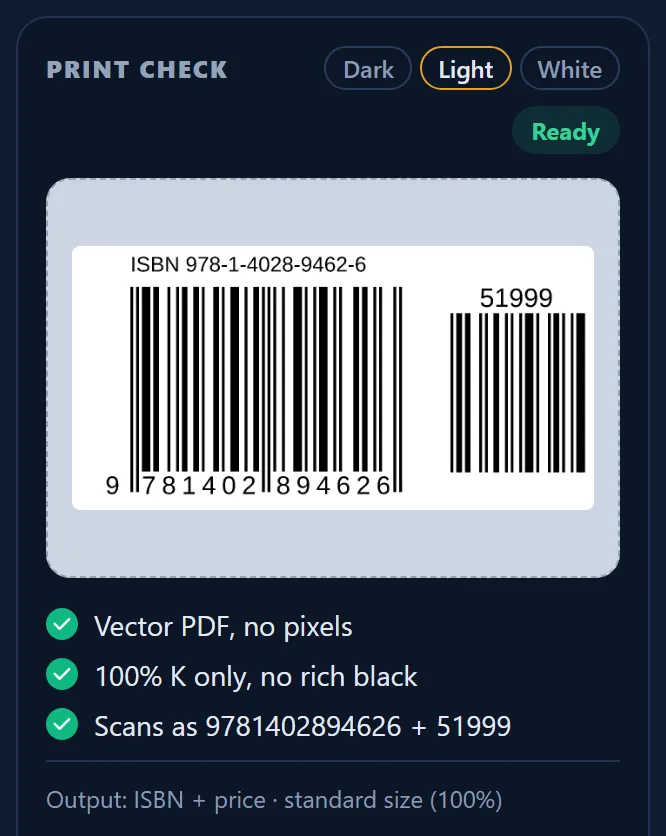
PRINT CHECK is the panel in the Barcode Rocket studio that shows a picture of your barcode and checks it before you download. Green checks confirm that the file is vector, uses only black ink (100% K) and scans as the number you typed. The Output line tells you which file and size you will get.
What you see
- The badge: Waiting (the number is not complete), Example (a sample, not yours), Ready (you can download).
- The picture of your barcode. It appears as soon as the number is complete.
- The green checks (see the next list).
- Output: the type and size of the file, for example "ISBN + price, standard size (100%)".
The green checks on every barcode:
- Vector PDF, no pixels: the file is made of shapes, so it stays sharp.
- 100% K only, no rich black: only the black ink is used.
- Scans as ...: the number a scanner will read, for example 9781402894626 + 51999.
Lines you see only on some types
- 0.5 pt overprint frame: only on the KDP layout.
- Valid QR code: on a plain QR code.
- Scans as your link: on the QR box.
Dark, Light, White
Above the picture is a switch: Dark, Light, White. It changes only the background behind the picture, not your file. Some labels have parts with no ink at all; the switch lets you see how the label looks on a dark or a light cover. Light is the usual choice, and the site remembers your choice in this browser.
Why it matters
The checks are made on your real barcode, not on a sample. The Scans as line is the most useful one: compare it with the number your ISBN agency or GS1 gave you, before anything is printed.