
For publishers & agencies
Branded barcode & QR templates
Your logo, ISBN barcode and QR link in one reusable layout. Made once, then used for every title as a print-ready vector PDF.
Discuss your project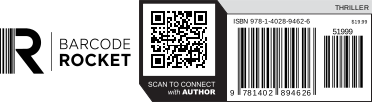
View specifications
The reserved code panel is the whole area of the barcode and the QR code with their labels. Each code also needs its own quiet zone; those are kept clear inside the panel and are not drawn one by one. The outlines are shown on this page only, never in the PDF.
| Layout | Logo beside |
|---|---|
| Overall PDF size | 131.33 × 35.96 mm |
| Barcode | ISBN (EAN-13) with the EAN-5 price add-on |
| QR code | Links to https://barcoderocket.com in this example |
| Example data | 978-1-4028-9462-6 · 51999 · $19.99 · THRILLER |
| Artwork | Vector paths, lettering outlined, no embedded images |
| Code color | C0 M0 Y0 K100 |
| Other fills | White only under the code panel, and a 15% K band behind the genre. The logo sits on a transparent background. |
| Transparent logo | Only the code has its white panel. Acrobat and Illustrator show an empty page as white, so place the PDF on a cover or a colored box in InDesign or Illustrator to see it. |
| Brand placement | Beside or above the reserved code panel, never inside it |
These sizes describe the demonstration files. Your template size, logo and print requirements are agreed separately.
View specifications
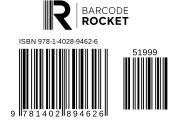
| Overall PDF size | 60.85 × 42.89 mm |
|---|---|
| Barcode | ISBN (EAN-13) with the EAN-5 price add-on 51999 |
| Logo | Its own area above the code panel |
| Colors | C0 M0 Y0 K100 on white, vector paths |
Final size, add-on and print requirements are agreed for your template.
View specifications
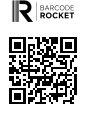
| Overall PDF size | 30.48 × 40.12 mm |
|---|---|
| QR code | Links to https://barcoderocket.com in this example |
| Logo | Its own area above the QR code |
| Colors | C0 M0 Y0 K100 on white, vector paths |
The link, print size, logo placement and clear space are agreed for each template. Scan a test print at the final size before production.
Demonstration examples. Use your own assigned ISBN and your own link for production. In every sample the logo is on a transparent background: place the PDF on a cover to see it.
How we work together
We create a template around your branding and print requirements, then agree on how your team will generate the files.
Send your logo and example data, including the ISBN, price and QR destination where needed. Tell us your preferred layout, required dimensions and expected volume.
We prepare a sample using your branding and example data. Your team can check the layout in Illustrator or Acrobat and request adjustments before approving the template.
Once approved and set up, your template can be used for individual files, batch generation or API integration. We agree on the option that fits your publishing workflow. Import a CSV of your ISBNs in your account and download every barcode in one ZIP.
What to send
- Vector logo (AI, EPS, SVG or PDF)
- One example title: ISBN, price and QR link
- The space available on the cover, in mm
- Your printer's PDF requirements, if any
- Roughly how many titles a month
Questions about custom templates
What can a custom template include?
A template can combine your logo, ISBN barcode, price add-on and QR code in one consistent layout. It can also include a genre label, short caption or other agreed elements.
The examples show several possible arrangements. Your template is built around your branding, available space and print requirements.
What do you need from us to get started?
Send your logo, example data and the dimensions or space available for the finished artwork. Include an ISBN, price and QR destination where relevant.
A vector logo is preferred. If your printer has specific color, background or PDF requirements, send those too. Tell us whether you need individual files, batch generation or API integration.
Can we use the same template across different titles?
Yes. The approved layout provides a consistent structure while the ISBN, price, QR destination and other supported fields change for each title.
We agree on which elements stay fixed and which fields your team can update. Additional imprints or substantially different layouts can be discussed separately.
Are the sample PDFs vector files?
Yes. The examples use vector paths for the barcode, QR code and logo, with lettering converted to outlines. They contain no embedded raster images.
You can open a sample in Illustrator to inspect the paths. Outlined lettering preserves its appearance without requiring the original font, but it is no longer editable as ordinary text.
What does “100% K black” mean?
The black code elements use CMYK values of C0 M0 Y0 K100. They are carried on the black plate, without cyan, magenta or yellow contributing to those elements.
This describes the codes, rather than every object in the layout. Backgrounds, labels and other design elements may use different agreed colors.
In Acrobat Pro, open Output Preview, select Separations and inspect the code elements to check their ink values.
How are the logo area and quiet zones different?
The branding area is the space allocated to your logo. The reserved code panel contains the barcode, QR code and their required clear margins.
A quiet zone is the clear space immediately around a code. For a standard QR code, this margin is four modules wide on every side; barcode margins depend on the barcode type.
The “Show reserved areas” option illustrates the allocated layout areas. Those guides are for the web preview and are not printed in the sample PDF.
Why does the preview show a white background behind the logo?
The examples use a white viewing surface, but the logo area in the supplied samples has no background fill. The code panel has its own white background.
Place the PDF over a colored area in your page layout to see the distinction. For your custom template, we agree on whether the branding area should remain without a background fill or use a defined background.
Can you configure overprint?
Yes. Overprint settings are agreed for the relevant objects in the template, taking your printer’s requirements into account.
Overprint is applied to specific fills or strokes. It is not a setting that should automatically be enabled for every element. You can inspect its effect using Overprint Preview in Illustrator or Simulate Overprinting in Acrobat Pro.
Can the QR code link to a different page for each title?
Yes. The QR destination can be a supported variable field, allowing each title to link to its own author page, book page, bonus content or other destination.
Check the complete URL before generating the production file. The destination encoded in an existing printed QR code stays the same; changing that destination requires a new code unless the URL itself uses a redirect you control.
Can we choose the dimensions and logo placement?
Yes. We agree on the overall size, logo position and code arrangement before approving the template.
The dimensions listed beside each example describe that particular sample. Your production template can use different agreed dimensions, while preserving the code proportions and required clear space.
Can we use these sample files for a published book?
The downloads are demonstration files containing example ISBNs, prices and QR destinations. Use them to inspect the artwork and evaluate the layout.
For production, generate a file using the ISBN assigned to your title, the intended price and your own QR destination. Downloading a sample does not assign an ISBN to your book.
How can we check a sample before approving it?
Download the PDF and place it in your intended cover or page layout at the proposed production size.
Check the logo placement, dimensions, ISBN, price, QR destination and clear margins. Your production team can inspect the vector paths in Illustrator and the separations and overprint behaviour in Acrobat Pro. Scan a printed proof of the codes as part of the final production check.
Can we generate files in batches or through the API?
Yes, by arrangement. An approved template can be configured for individual generation, batch processing or API access, depending on your workflow.
For integration testing, you can request a trial key. Trial keys return PNG previews; live API access enables print-ready PDF output. The API documentation explains the supported requests and applicable limits.
Can we import a list of ISBNs from a spreadsheet?
Yes. In your account, open A list and use Import CSV: one title per line, with the ISBN and the other fields your template uses. Every barcode comes back as a separate vector PDF in one ZIP, and lines with an error are listed in errors.csv. Up to 50 titles per run; larger batches by arrangement.
How are custom templates and API access priced?
Custom templates and API access are arranged according to the layout, required fields, expected volume and generation method.
Send us a sample of your data and a short description of your workflow. We can then discuss the template setup and access options that suit your team.
Show us what your team needs
Tell us about your branding, your output requirements and the volume you expect. We reply personally within one working day.