
Getting started
Do I need an account to use Barcode Rocket?
Answer
No. Without an account you can make book barcodes (ISBN, ISBN with a price, KDP layout, IngramSpark layout) and plain QR codes, up to 20 downloads a day from your network. A free account with a confirmed email adds product barcodes, Connect QR, QR box, lists of up to 50, History, Rocket Pass and no waiting.
What each option includes
| Without an account | Free account, email confirmed | |
|---|---|---|
| ISBN, ISBN with price, KDP layout, IngramSpark layout | Yes | Yes |
| Plain QR code | Yes | Yes |
| Connect QR and QR box | You can try the example | Yes |
| Product barcodes (EAN, UPC), cartons, GS1 Composite | You can try the example | Yes |
| One at a time | Up to 20 downloads a day from your network | 20 new barcodes a day |
| Lists of up to 50 at once | No | Yes, 50 new barcodes in any 7 days |
| Downloading the same barcode again | Counts as a download | Free, never counts |
| At very busy times | Downloads may wait, be limited to fewer a day, or pause for a while | Not affected |
| History and Download again | No | Yes |
| Inbox (updates and messages to us) | No | Yes, also before you confirm |
Both are free. A free account needs only an email and a password, no card.
What you see when a type needs an account
A type that needs an account shows a lock and the words Free account. You can still pick it and see the example picture, but the download button stays gray and the site says: "Example. This barcode type comes with a free account."
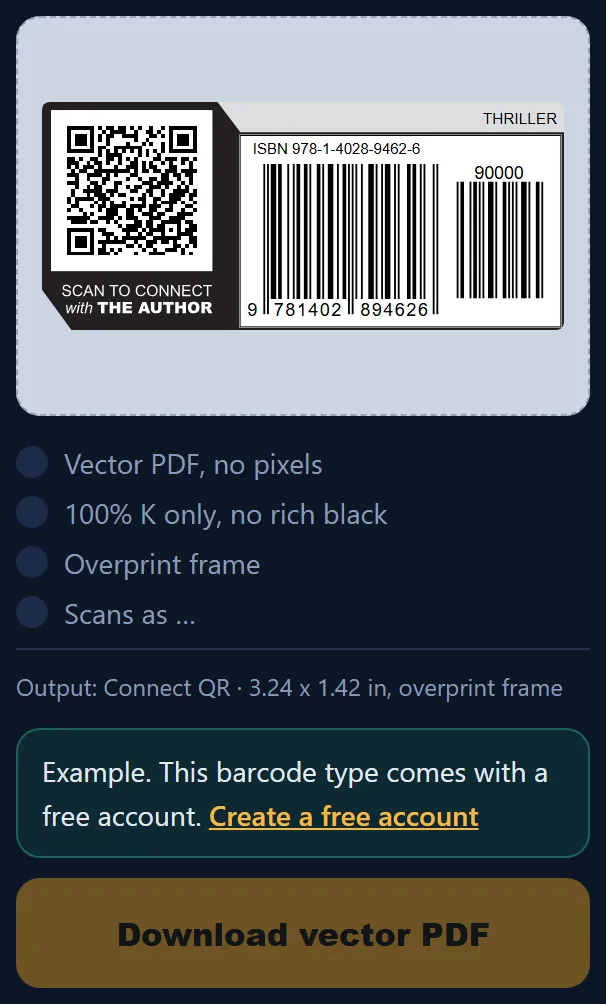
If you have an account but have not confirmed your email yet, the same types say Unlocks when you confirm your email. Until you confirm, your account works like a visitor, except that your Inbox already works.
Which one should I choose?
Most authors need one or two book barcodes and never need an account. If you have a series, change prices, want a QR label or want to download your files again later, the free account saves you work.
The full rules are in the Terms, section 2 (Free limits).